If you’ve spent any time studying SEO, you’ve probably come across the terms nofollow vs. dofollow links. Understanding the difference between these two link types is one of the most practical things you can do to strengthen your website’s SEO strategy.
At ZenvySEO, we break down exactly what each link type means, when to use them, and how to manage them effectively — without the technical jargon.
What Is a Nofollow Link?
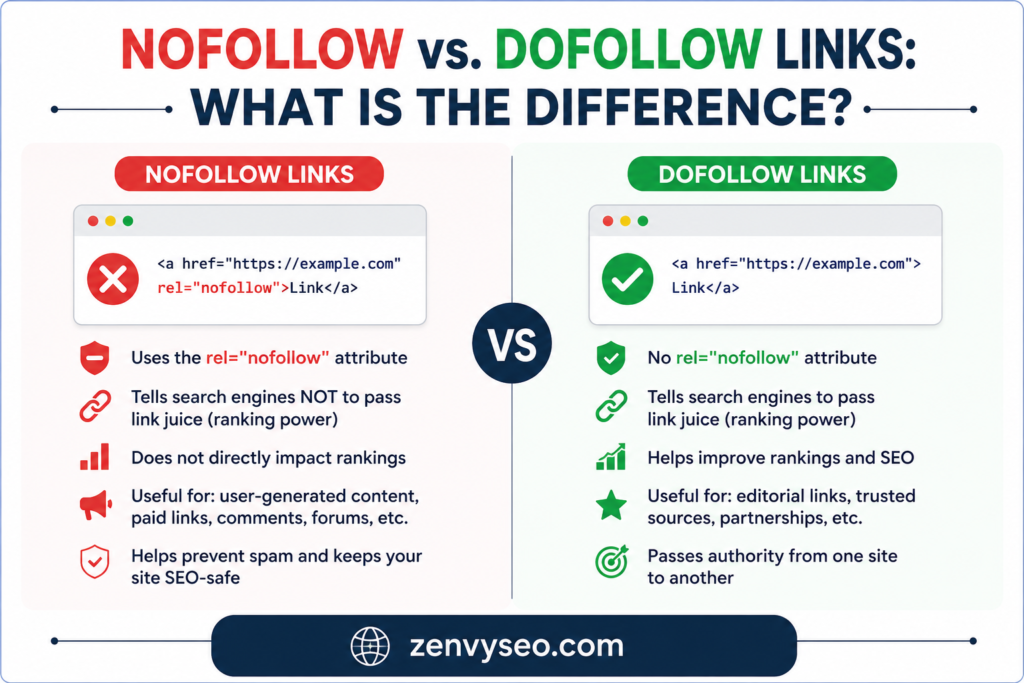
A nofollow link is a standard hyperlink that carries a special rel=”nofollow” attribute in its HTML code. This small tag tells search engine crawlers — like Googlebot — not to pass any link authority (commonly called “link juice” or PageRank) from the linking page to the destination page.
Here’s what the HTML looks like:
html
<a href=”https://example.com” rel=”nofollow”>Anchor Text</a>
Without this attribute, a link is treated as a dofollow by default. Nofollow links were first introduced by Google in 2005, primarily to fight comment spam. Over the years, their use has expanded to cover paid placements, user-generated content, and any situation where a site owner doesn’t want to vouch for the linked page.
Key point: A nofollow link does not transfer PageRank or ranking signals to the destination URL. However, it can still send real visitors to that page through direct clicks.
Rel=”sponsored” and Rel=”ugc” Link Attributes
In September 2019, Google expanded the nofollow ecosystem by introducing two new link attributes:
- rel=”sponsored” — Use this for links that are part of paid partnerships, advertisements, or affiliate arrangements. It clearly signals to Google that the link exists for commercial reasons.
- rel=”ugc” (User Generated Content) — This attribute is meant for links appearing inside user-submitted content, such as blog comments and forum posts. It tells Google the site owner may not endorse these links directly.
You can also combine attributes, for example:
html
<a href=”https://partner.com” rel=”nofollow sponsored”>Visit Partner</a>
These granular tags help Google understand the context of your outbound links, which supports a more transparent and trustworthy web.
What Is a Dofollow Link?
A dofollow link is essentially the default state of any hyperlink. There is no actual rel=”dofollow” attribute in HTML — “dofollow” is simply SEO industry shorthand for “a regular link without the nofollow attribute.”
When a page links to another page with a dofollow link, it passes ranking authority (PageRank) from the source to the destination. Search engines follow these links, crawl the linked pages, and count them as endorsements in their ranking algorithms.
html
<a href=”https://example.com”>Anchor Text</a>
This is how dofollow links appear in HTML — clean, simple, and no special attributes. When you earn a dofollow backlink from a high-authority website, that link acts as a “vote of confidence” that can directly improve your search rankings.
What Is the Difference Between Dofollow and Nofollow Links?
Here’s a quick Nofollow vs. Dofollow Links side-by-side comparison:
| Feature | Dofollow Links | Nofollow Links |
| Passes PageRank / Link Juice | ✅ Yes | ❌ No |
| Crawled by search engines | ✅ Yes | Hints to skip (not guaranteed) |
| Impacts search rankings | ✅ Direct impact | Indirect at best |
| HTML attribute required | None (default) | rel=”nofollow” |
| Common use case | Editorial, trusted links | Ads, comments, UGC |
| Sends referral traffic | ✅ Yes | ✅ Yes |
The core Nofollow vs. Dofollow Links difference: dofollow links contribute directly to ranking power, while nofollow links guide crawl behavior and help maintain a natural, compliant backlink profile.
Why Are Nofollow Links Important?
Many site owners mistakenly dismiss nofollow links as “useless.” At ZenvySEO, we strongly disagree. Nofollow links play four important roles in a healthy SEO strategy.
a) Extra Brand Exposure and Referral Traffic
Even without passing link equity, a nofollow link from a high-traffic site can send thousands of real visitors to your page. Brand mentions on major publications, social media platforms, and news sites are almost always nofollow — and they’re still incredibly valuable for visibility and audience growth.
b) Healthy Backlink Profile Diversity
A backlink profile made up entirely of dofollow links looks unnatural to Google. Real websites accumulate a mix of both. If your link profile skews too heavily toward dofollow links from suspicious sources, it can raise red flags. A healthy mix of nofollow and dofollow backlinks signals organic, authentic growth.
c) Better Outbound Link Control
When you link out to external sites, using nofollow protects your site’s own authority. You don’t want to unintentionally pass PageRank to low-quality, unrelated, or paid sources. Adding rel=”nofollow” or rel=”sponsored” keeps your link equity exactly where it belongs — on your own site.
d) Improved Crawling and Indexing
Selectively nofollowing certain internal or external links can help Googlebot spend its crawl budget more efficiently. Instead of wasting time on thin, duplicate, or auto-generated pages, search engines can focus on your most important, high-value content.
When to Use Nofollow Links?
Knowing when to apply the nofollow attribute is just as important as understanding Nofollow vs. Dofollow Links what it does.
Endorsed External Websites
Counterintuitively, you should NOT use nofollow when linking to websites you genuinely endorse or recommend. But if you’re unsure about the quality of an external source — or don’t have an editorial relationship with it — adding nofollow is a smart safeguard.
User-Generated Content
Any links submitted by users — in blog comments, forum threads, or review sections — should carry rel=”ugc” (or at minimum rel=”nofollow”). This prevents users from manipulating your site’s link equity through comment spam.
Irrelevant or Spammy Pages
Never pass PageRank to pages that are spammy, untrustworthy, or completely unrelated to your content. If you must reference such a page (for context or citation), use a nofollow attribute to protect your site’s authority.
Duplicated or Auto-Generated Pages
Faceted navigation, URL parameter pages, and filter-generated pages often produce near-duplicate content. Using nofollow on internal links to these pages prevents Google from wasting crawl budget on pages that don’t contribute unique value to your site.
When to Avoid Using Nofollow Links
There are clear situations where using nofollow would actually hurt your SEO.
For Most Internal Links
Internal links are how you distribute PageRank across your own website. Nofollowing your internal links essentially blocks your authority from flowing to important pages. As a rule, keep all standard internal links as dofollow — let your PageRank flow naturally.
For Relevant External Websites
When you link to a credible, relevant, high-quality external resource, dofollow is the right choice. These editorial links reflect positively on your site, show Google you’re connecting users with valuable information, and build trust with both readers and search engines.
How to Check Nofollow and Dofollow Links
Not sure how a specific Nofollow vs. Dofollow Links is tagged? Here are five reliable methods.
1. Check the Page Manually
Right-click any page and select “View Page Source” (or press Ctrl+U). Use Ctrl+F to search for rel=”nofollow” and locate which links carry the attribute.
2. Use Mangools SEO Extension
The Mangools browser extension highlights nofollow links visually as you browse. Nofollow links are marked with a distinct icon, making it easy to audit any page without digging through source code.
3. Utilize an SEO Audit Tool
Tools like Screaming Frog or Semrush can crawl your entire site and export a full list of links with their attributes — both internal and external. This is the most scalable approach for large sites.
4. Use SiteProfiler
Mangools’ SiteProfiler shows you the backlink profile of any domain, including a breakdown of dofollow vs. nofollow ratios. This is useful when evaluating competitor link profiles or auditing your own.
5. Check LinkMiner
LinkMiner (also by Mangools) lets you analyze the backlinks of any page in detail. You can filter results to show only dofollow or nofollow links, check link strength, and identify your strongest referring pages.
How to Manage Nofollow and Dofollow Links on a WordPress Site
WordPress doesn’t add rel=”nofollow” to links by default. Here’s how to control Nofollow vs. Dofollow Links attributes on your WordPress site.
Edit Links Manually in WordPress Editor
In the Block Editor (Gutenberg):
- Highlight the anchor text you want to modify.
- Click the link icon in the toolbar.
- Click the three-dot menu (⋮) next to the link field.
- Select “Edit as HTML.”
- Add rel=”nofollow” (or rel=”sponsored”) directly inside the <a> tag.
- Click “Edit visually” to return to the normal editor view.
This approach gives you precise, link-by-link control — ideal for managing a handful of affiliate or sponsored links.
Use a WordPress Plugin
For sites with dozens or hundreds of external links, manual editing quickly becomes tedious. These plugins handle it automatically:
- WP External Links — Automatically adds rel=”nofollow noopener” to all external links. You can whitelist specific trusted domains to remain dofollow.
- ThirstyAffiliates — Built for affiliate marketers. Cloaks affiliate URLs and auto-applies rel=”sponsored” or rel=”nofollow” as needed.
- Slim SEO — Allows you to set nofollow, sponsored, or UGC attributes from directly within both Classic and Block editors.
- Ultimate Nofollow — Adds a simple nofollow checkbox to the link popup in Classic Editor.
Using a plugin ensures consistency across your entire site, reduces the chance of human error, and saves hours of manual work.
Conclusion
Understanding nofollow vs. dofollow links is one of those fundamentals that every website owner — beginner or advanced — needs to get right. Dofollow links are the backbone of off-page SEO, passing authority and directly improving your rankings.
Nofollow links, while they don’t pass PageRank, protect your link equity, build a natural backlink profile, and still drive genuine traffic.
At ZenvySEO, the right approach is balance. Use dofollow links for trusted, editorially-placed resources. Use nofollow (and its modern variants rel=”sponsored” and rel=”ugc”) wherever commercial relationships, user content, or uncertain page quality are involved. Manage your links strategically, and your site will earn the trust of both Nofollow vs. Dofollow Links users and search engines over time.
Frequently Asked Questions (FAQs)
Q1: Does a nofollow link have any SEO value?
Yes — nofollow links won’t pass PageRank, but they still drive referral traffic, build brand awareness, and contribute to a natural-looking backlink profile that Google trusts.
Q2: Is “dofollow” a real HTML attribute?
No. “Dofollow” is SEO shorthand for a standard link without the rel=”nofollow” attribute. Every link is dofollow by default unless nofollow is explicitly added.
Q3: Should I nofollow all outbound links?
No. Only nofollow links to paid placements, user-generated content, or pages you don’t want to endorse. Links to high-quality, relevant external pages should remain dofollow.
Q4: What’s the difference between rel=”nofollow” and rel=”sponsored”?
Both Nofollow vs. Dofollow Links prevent PageRank transfer, but rel=”sponsored” specifically signals a paid or affiliate relationship, while rel=”nofollow” is a general instruction not to follow the link.
Q5: Can I nofollow internal links?
You can, but you generally shouldn’t. Nofollowing internal links blocks PageRank from flowing through your own site, which can harm the rankings of your important pages.